Time Invoice Studio

Time and invoices for firms of 3 to 10

The week’s hours, approved and on a client-ready invoice.

Log the week’s time, approve it in one pass, and make an invoice whose arithmetic you can check. $49 buys 30 days for the whole workspace, with no automatic renewal.

The sample is the working product with a fictional five-person firm: no signup, discarded after 12 hours. The trial is your own workspace for 14 days and needs no card.

Sample data · fictional firm

Monday morning

Read the week on one pink copy. Approve it in one pass.

People log time from the timer on every screen or type it into the week: 1.5, 1:30 and 90m all work. When they submit, their slips land on your review copy, grouped by person. Approve all of them, or send one back with a note. Nothing is billable until you approve it.

The finished invoice

Every amount shows its arithmetic.

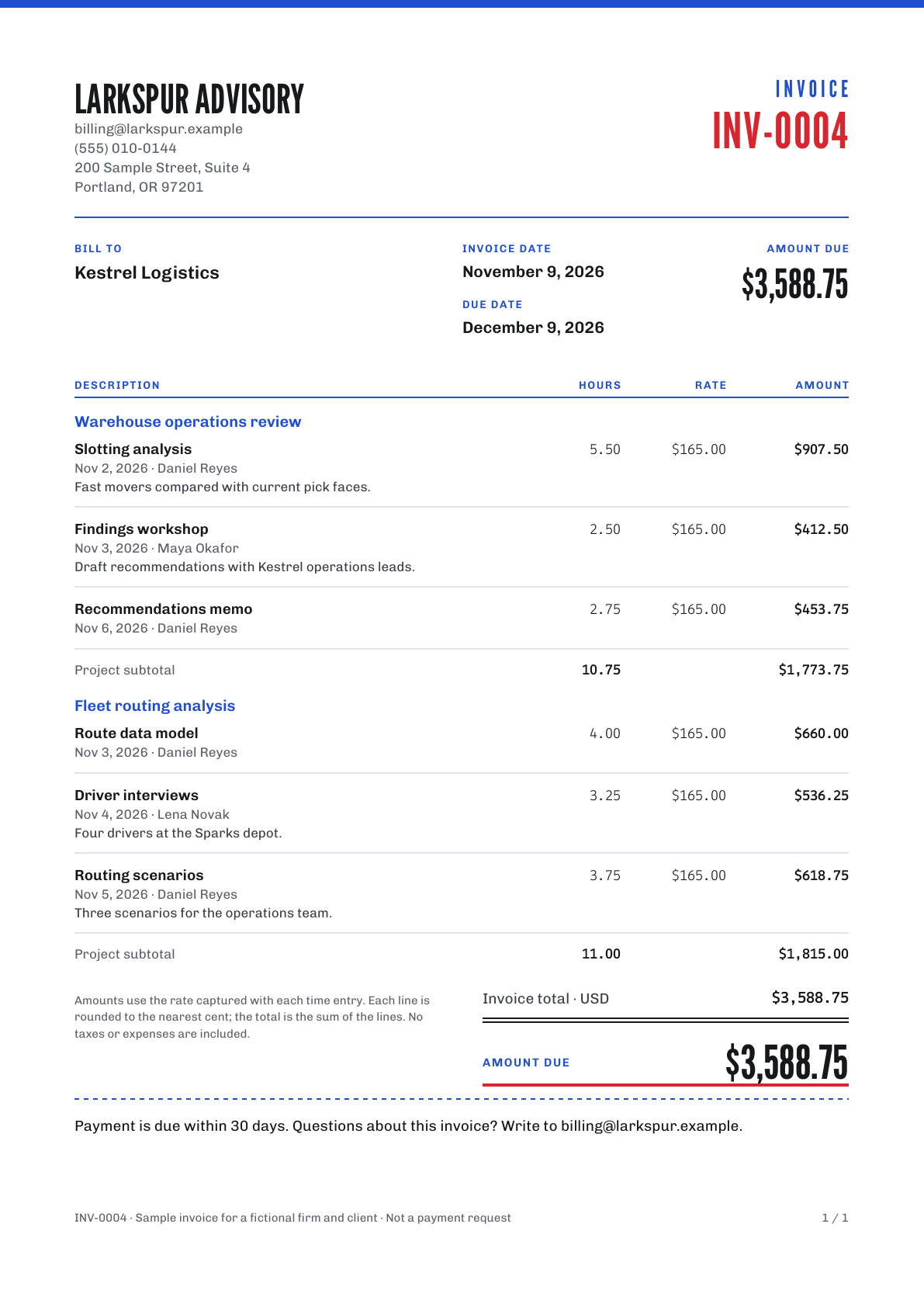
The sample PDF, page one: Larkspur Advisory’s invoice INV-0004 to Kestrel Logistics with the red serial number, six lines grouped under two projects, and $3,588.75 due.
  1. Hours × the rate you captured

    Each line is the hours times the rate in force when the time was logged, rounded once, to the cent. Changing a project’s rate later never rewrites logged or invoiced time.

  2. A tape that agrees with the total

    The invoice builder prints a proof tape beside the preview, line by line, and checks its total against the invoice before you create it.

  3. The next number, and the hours lock

    Creating the invoice takes the next number in your sequence and locks its entries, so the same hours can never be billed twice.

  4. Corrections leave a record

    Void an invoice with a reason and prepare a replacement with a new number. The original stays on file, and payments you record keep the balance true.

Download the sample PDFMade by the product for the fictional sample firm. No taxes or expenses; it is not a payment request.

Switching from Harvest

Bring last year with you. Nothing becomes billable by accident.

Export your detailed time from Harvest and preview it here first. Every row is checked, totals reconcile by day, person and project, and you decide which person each name belongs to. Imported hours stay archived history and are never invoiced again. Undo the whole batch whenever you like.

Leaving is just as plain: download the complete workspace as JSON, or your new time in Harvest’s import format.

Read the Harvest CSV import guide and download an example

Uses Harvest’s documented CSV format. Not affiliated with Harvest.

Price

One workspace, one number on the bill.

$49 for 30 days, for up to ten people. No seats to count, no usage charges and no automatic renewal: you buy the next 30 days when you want them.

Time Invoice Studio

Your bill for 30 days

Paid once · USD
Bill to
Your firm, up to ten people
Trial
14 days, no card
DescriptionQtyAmount
Workspace: timer, timesheet, approvals, invoices, reports, import and exports1$49.00
People, up to tenup to 10$0.00
Clients, projects and invoices: no per-item charge—$0.00
Usage chargesnone$0.00
Total for 30 days$49.00

The trial is 14 days with no card. After it, a pass is one payment of $49.00 for 30 days: that is the whole charge, it does not renew, and nothing is ever charged automatically. When no trial or valid pass covers the workspace, editing pauses; timesheets, invoices, reports and exports stay readable and downloadable. The owner can refund the latest pass in full within 7 days, once per workspace.

Keep this partStart a 14-day trialNo card for the trial. Nothing renews by itself.

Questions

Can members see rates or invoices?

No. Members see and submit their own time and the projects they can log to. Rates, approvals, invoices, imports and exports are for owners.

How are amounts calculated?

Each line is hours × the rate captured when the time was logged, rounded half-up to the cent. The invoice total is the sum of its lines. Changing a project’s rate never rewrites logged or invoiced time.

What if an invoice is wrong?

Void it with a reason and prepare a replacement with a new number. The original stays on record, and its hours are released for the replacement only.

Can I get my data out?

Yes, at any time, and after a trial or a pass ends: a complete JSON archive including original import files, plus your new time as a Harvest-format CSV.

What happens when a trial or a pass ends?

Editing pauses and the workspace becomes read-only. Nothing is charged, because nothing renews. Everything you recorded stays readable, and exports keep working. Buy 30 days whenever you want to carry on.

Can I get a refund?

Yes. The workspace owner can request a full refund of the most recent pass within 7 days of buying it, from the plan page, once per workspace. Access from that pass pauses while the refund is pending. Any unexpired trial or other valid pass still provides access; records and exports stay available. For other payment questions, use the support contact in the terms.

Is the sample a real copy of the product?

The software is the same; the firm, people and clients are fictional. You can approve time, create invoices, record payments and download PDFs. Nothing is sent anywhere.